
Stop paying for computers that aren't in use.
I set up AWS for small businesses so the computer runs when there is work and shuts off when there isn't.
Email me about a projectYou don't own a power plant
Nobody builds a power plant to keep the lights on. You plug into the grid and pay for what you use. Computing went the same way. Instead of buying a server sized for your busiest day and leaving it on all year, you rent exactly what a job needs, for as long as it runs. If a job suddenly needs a hundred times the power, it's there, and it's off your bill when the job ends.
Large companies moved to this model years ago. It works the same for a five-person shop. And since nothing lives in a closet at the office, your files and tools are reachable from home, a job site, or a second location.
What I do
Three ways to stop paying for idle computers.
Jobs that run only when there's work
Photo stitching, map exports, reports, file conversions: anything that cooks a laptop for hours or sits on an always-on server doing nothing. An upload, a schedule, or a button starts the computer. The job finishes. The computer shuts off.
Nights-and-weekends shutoff
Dev, staging, and office servers rarely need to run at 2 a.m. A schedule stops them after hours and starts them before anyone shows up. AWS's own estimate is up to 70% off compute for servers that only matter during business hours.
AWS bill review
Idle servers, old disks, snapshots nobody remembers. I look with read-only access and hand you a written list of what is costing money and what removing it would save. Fixing it is optional and quoted separately.
Included with every job
- A text or email when something fails.
- A spending alarm, so a bill never surprises you.
- A written runbook, and everything built in your own AWS account. You own it, and nothing depends on me sticking around.
A drone mapping pipeline that turns itself off
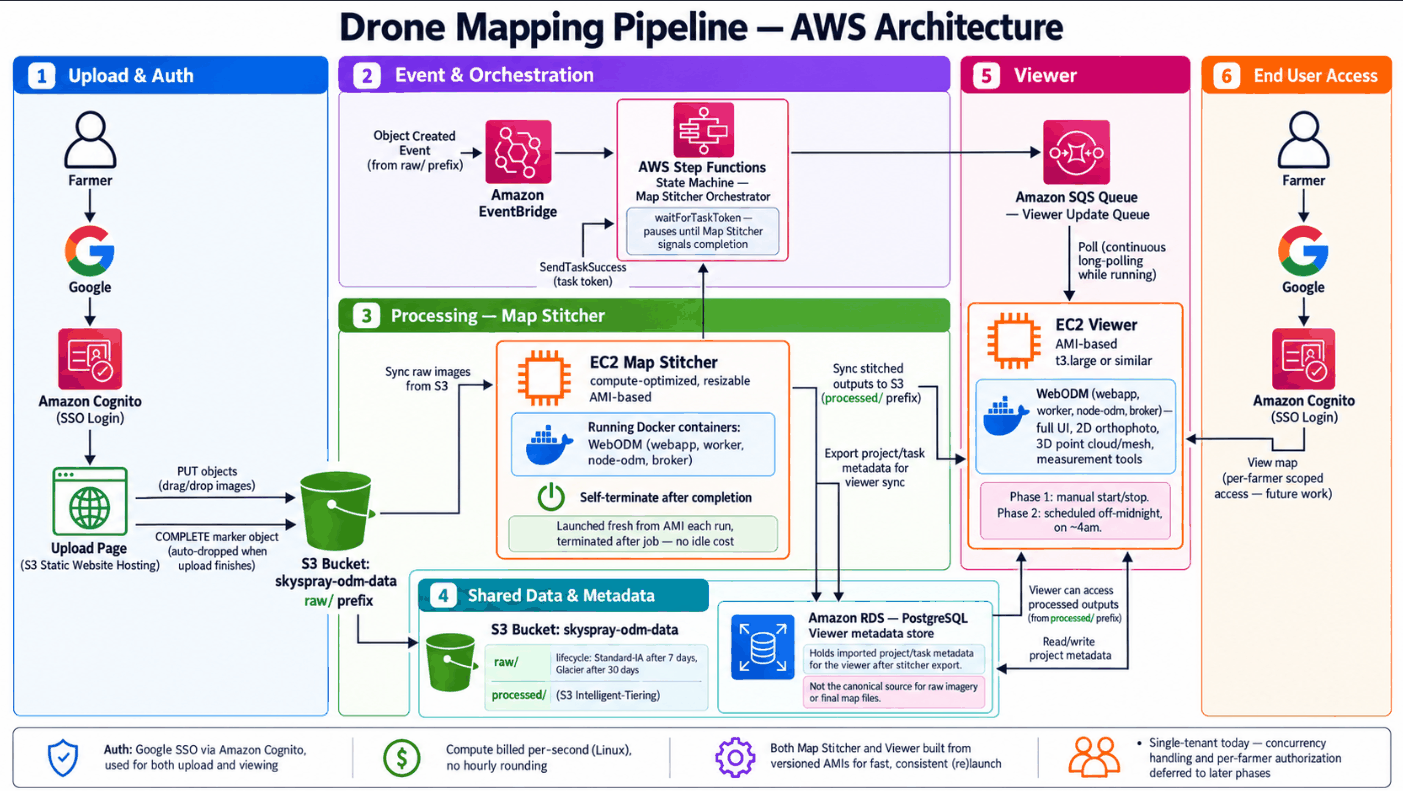
For an agricultural drone operation, I built a pipeline that turns hundreds of field photos into one stitched map. The pilot uploads the photos. That upload starts a large server, the stitching runs, the finished map is saved, and the server shuts itself off. A watchdog checks every 30 minutes and stops anything that runs too long.
The stitching server is launched fresh for each job and terminated when it finishes, so it costs nothing between flights.
About
I'm Reed Covert. I spent 11 years as an ISP field technician, splicing fiber, building network racks, and fixing outages. I now hold four AWS certifications, including Solutions Architect and CloudOps Engineer.
I understand both ends: the network in your building and the servers in the cloud. That's the bridge. Based in Minnesota.
How I work
- A short conversation about the workload and what "done" looks like.
- A fixed scope and a quote before any work starts.
- You get working infrastructure, a runbook, and the keys.
Contact
Tell me what you're trying to run and I'll reply with questions or a rough plan.
reed@covertcloudconsulting.com